Disaster Recovery: Asking the wrong question?

image

In my role as an Azure specialist I get asked a lot of questions about Disaster Recovery. IMHO they almost always ask the wrong question.

Usually it goes something like “I need Disaster Recovery protection for my data center. I have N VMs to protect. I have heard that I can use Azure Site Recovery either to facilitate Disaster Recovery to my backup data center, or even use Azure as my backup data center.” That is true. Smile

In a previous lifetime I used to work on a Disaster Recovery  testing team for a major New York based international bank. We learned early on two major principles:

1. It is all about workloads since different application workloads have different Disaster Recovery  requirements. Every workload has unique Recovery Time Objectives (RTO) and Recovery Point Objectives (RPO). Not all workloads are created equal.   For instance email is a critical workload in the typical enterprise. An outage of more than a few hours would affect business continuity significantly.  Other application workloads (such Foreign Exchange Trading, Order Processing, Expense Reporting, etc.) would have more or less stringent RTO and RPO requirements.

2. So it is really is all about Business Continuity. Disaster Recovery is a business case. It is clear that providing perfect Disaster Recovery for all application workloads would be extremely expensive; and in many cases not cost effective. In effect there is an exponential cost curve. So it is all about risk management and cost/benefit.

So where does that leave us?

1. Evaluate your Disaster recovery requirements on a workload by workload basis

2. Plan how to implement it considering the objective of Business Continuity, RTO and RPO.

3. Use Azure Site Recovery to make it happen. Smile

Bill

Posted in Architecture, Buisness Continuity, Cloud, Cloud Computing, Disaster Recovery, IaaS, Microsoft Azure | Tagged , , , | Leave a comment

Web and Worker Roles: What do I do now? Part 2

image

In my previous blog post in this series I made some recommendations for migrating Cloud Services (Web and Worker Roles) to alternative architectures now that Cloud Services are considered legacy and Microsoft will not be spending any further effort enhancing them. Two solutions that I proposed were Web Apps/Web Jobs and Azure Service Fabric.

After that blog post I did receive some interesting feedback:

“We use Web/Worker Roles with custom software installed and a few other things enabled, so we need a bit more customization than Web Apps provide. Further, we do CPU intensive processing on Worker Roles, and as far as I know Web Jobs run on the same Virtual Machines that serve the Web Role instances; which isn’t suitable for us.”

“Azure Service Fabric is great, but I haven’t been able to confidently decide to move our current apps across to it. There are too many unanswered questions, plus a steep learning curve and necessary tooling improvements are needed.”

These are valid comments; that there is a somewhat steep learning curve; that tooling improvements are needed and that there are still unanswered questions; mostly due to the early state of documentation and the ongoing evolution of Service Fabric.

I empathize with the plight of anyone faced with this decision. It is a decision that many of us who have currently implemented Azure applications are facing. If you need that level of customization you should look at migrating them to Azure Service Fabric Reliable Services or, in the extreme, to Single Instance Virtual Machines and/or Virtual Machine Scale Sets. (Single Instance Virtual Machines are Virtual Machines that are not part of a Virtual Machines Scale Set, as discussed below)

The World before Azure Service Fabric and Virtual Machine Scale Sets

Up until the end of 2015 (when it was last updated) this white paper was an excellent guide to choosing the appropriate Compute option for an Azure application. It covered the tradeoffs between:

  1. Web Apps
  2. Cloud Services
  3. Virtual Machines

It even provided a nice decision table for selecting between them. I used this article to guide many Azure developers in the selection of a compute methodology.

Scott Hanselman has been quoted as summing this up as: “Its Web Apps until it’s not, then it’s Cloud Services until it’s not, then its Virtual Machines.” This does not, however, include Azure Service Fabric and Virtual Machine Scale Sets, which did not exist at the time the article was last updated.

What’s changed?

The above document needs an update to add Azure Service Fabric & Virtual Machine Scale Sets. It could also possibly omit Cloud Services since that is now a legacy technology. If course Cloud Services are not going away. They will be supported for some time. So they may want to keep it in.

The white paper mentioned above was updated recently to include Azure Service Fabric in it’s comparison table.  It still has yet to be updated for Virtual Machine Scale Sets.  Even though it was updated to include Azure Service Fabric in the comparison table the body of the report continues to focus primarily on the other alternatives such as:

  1. Web Apps
  2. Cloud Services
  3. Virtual Machines

It still does not list the reasons for choosing Azure Service Fabric over the other alternatives. Hopefully it will be amended again soon to cover more of the tradeoffs in closing between the options; and also to add Virtual Machine Scale Sets.

Remember, before we proceed though that Azure Service Fabric & Virtual Machine Scale Sets are still in preview, but if you are building new greenfield applications or planning to migrate existing brownfield applications to the newer architectures in the near future it is not too soon to start considering them.

Let’s compare the options:

WebApps

These are often compared to Cloud Services Web Roles. They are based on a pool of Virtual Machines running a pool of IIS instances.

  1. Load Balancer automatically created.
  2. Auto scaling provided by the platform.
  3. Microsoft takes care of all patching of underlying Virtual Machines.
  4. Stateless applications.
  5. No Startup tasks. (See Cloud Services below.)
  6. Cannot Remote Desktop into underlying Virtual Machines.
  7. Multiple environments supported.
  8. Tooling support in Portal, Visual Studio, SDKs and other tools.
  9. Well documented with lots of examples.
  10. Management Complexity: easiest if you can fit within its limitations.

WebJobs

Web Jobs are lightweight background workers. They are often compared to Cloud Services Worker Roles.

  1. Web Jobs run in the same Virtual Machines with Web Apps. So they share many of the same resources and can degrade Web App performance.
  2. Load Balancer automatically created,
  3. Auto scaling provided by the platform,
  4. Microsoft takes care of all patching of underlying Virtual Machines.
  5. Stateless applications that are self-healing.
  6. No Startup tasks. (See Cloud Services below.)
  7. Cannot Remote Desktop into underlying Virtual Machines.
  8. Multiple environments supported.
  9. Tooling support in Portal, Visual Studio, SDKs and other tools.
  10. Well documented with lots of examples.
  11. Complexity: easiest if you can fit within its limitations.

Cloud Services

  1. Based on a collection of individual Virtual Machines.
  2. Load Balancer automatically created.
  3. AutoScaling provided by the platform.
  4. Microsoft takes care of all patching of underlying Virtual Machines.
  5. Stateless applications that are self-healing.
  6. Startup tasks: To install software and do other in-the- Virtual Machine configuration tasks.
  7. Can Remote Desktop into underlying Virtual Machines.
  8. Multiple environments supported.
  9. Tooling support in Portal, Visual Studio, SDKs and other tools.
  10. Well documented with lots of examples.
  11. Complexity is moderate, but remember that Cloud Services are legacy.

Individual Virtual Machines

  1. Virtual Machines created one at a time.
  2. Load Balancer: Not automatically provided. Must create one.
  3. Auto scaling with need to pre-create all Virtual Machine instances.
  4. Microsoft does not update these Virtual Machines. You are responsible.
  5. Stateless and Statefull applications, but up to you to manage.
  6. Virtual Machine Extensions for Startup customization.
  7. Can Remote Desktop into underlying Virtual Machine.
  8. Multiple environments are up to you to create and manage.
  9. Tooling support in Portal, Visual Studio, SDKs and other tools.
  10. Well documented with lots of examples.
  11. Complexity is high.

Virtual Machine Scale Sets

  1. Based on a Virtual Machine template used to create several Virtual Machines in a Scale Set.
  2. Load Balancer: Configured as part of Scale Set creation if you use a Scale Set Template
  3. Auto scaling with no need to pre-create Virtual Machines in the set.
  4. Microsoft does not update these Virtual Machines. You are responsible.
  5. Stateless and Statefull applications, but up to you to manage.
  6. Virtual Machine Extensions for Startup Tasks.
  7. Can Remote Desktop into underlying Virtual Machines.
  8. Multiple environments are up to you to create and manage.
  9. Tooling support in Portal, Visual Studio, SDKs and other tools.
  10. Well documented with lots of examples.
  11. Less Complexity than Individual Virtual Machines.

Azure Service Fabric

Note: Comparison with Service Fabric is still difficult because it is in a state of flux and still evolving. And the documentation is evolving with it. However here are some of its characteristics for comparison:

  1. Based on deploying into pre-existing clusters using Virtual Machine Scale Sets and/or Containers. Also will run on premises under Windows Server and Azure Stack as well as on other platforms such as Linux.
  2. Load Balancer automatically provided for the cluster.
  3. AutoScaling (to millions of Transactions per second)
  4. Microsoft does not update these Virtual Machines. You are responsible.
  5. Stateless and Statefull applications that are self-healing. Azure Service Fabric has two application models: Reliable Services (closest to what you have now in your Cloud Services) and Reliable Actors (which could require significant refactoring of your application.). It also includes Reliable Collections for state management.
  6. Virtual Machine Extensions for Startup Tasks.
  7. Can Remote Desktop into underlying Virtual Machines.
  8. Multiple environments are up to you to create and manage.
  9. Tooling support in Portal, Visual Studio, SDKs and other tools such as the Service Fabric Explorer.
  10. Documentation: Still scarce and under change due to the evolving nature of the service. Hopefully this will settle down soon.
  11. Complexity: High. Fairly steep learning curve. But very rewarding. Smile

Recommendations

So, when all is said and done, what do we recommend? That depends on whether you are migrating an existing brownfield application or designing a new greenfield one.

Brownfield applications

These are the most challenging. If it “fits” Web Apps/Web Jobs use that approach. If not, then Azure Service Fabric Reliable Services is the next choice to evaluate. And, just like in the case before where Virtual Machines was always a valid last choice you can choose that approach, however even there you have two options, Individual Virtual Machines or Virtual Machines Scale Sets. And consider using Reliable Collections as an alternative to other existing forms of state management and as an alternative of Azure Storage Queues.

So you can start with a lift-and-shift approach to migration and refactor later to take advantage of micro-services and possibly the Actor Model.

Greenfield applications

Here the sky’s the limit. I would first decide how scalable I want my applications to be. If I expect hundreds or thousands of transactions per second, I would look at Azure Service Fabric Reliable Actor model first. After that I would consider Reliable Services.

If nether of this approaches work for you then maybe Virtual Machine Scale Sets is the architecture to choose. Individual Virtual Machines are probably an option now only for fairly simple architectures that don’t need the scalability of Virtual Machine Virtual Machine Scale Sets. Or for the situation where you have to go above and beyond what the other options provide to roll-your-own architecture.

But remember the Architect’s rule: “It all Depends” Smile

What do you think?

Bill

Posted in Application Development, Architecture, Cloud, Cloud Computing, IaaS, Microsoft Azure, Microsoft Azure WebApps, Microsoft Azure WebJobs, PaaS, Windows Azure, Windows Azure Web Sites | Tagged , , , , | 7 Comments

Web and Worker Roles: What do I do now? Part 1

This is Part 1 of a Two-part series. See Web and Worker Roles: What do I do now? Part 2

For those of you who may not have noticed PaaS V2 (Azure Service Fabric) was announced a while back. The familiar PaaS V1 Cloud Services based Web and Worker Role architecture is now legacy. They aren’t going away, but Microsoft will not be spending any more development effort on them. PaaS V2 is the future.

So what do I do now? Of course I can keep my Web and Worker Role based applications running as-is or start to migrate to one of two newer architectures:

The traditional architecture of Cloud Services that has been with us since the beginning of Azure normally follows the pattern of a web farm implemented as a multi-instance Web Role which passes data through an Azure Storage Queue (and often) Azure Blobs and/or Tables to a pool of one or more Worker Roles used to do background processing.

image

One natural migration path is to replace the Web Role with a WebApp and the background Worker role with a WebJob.

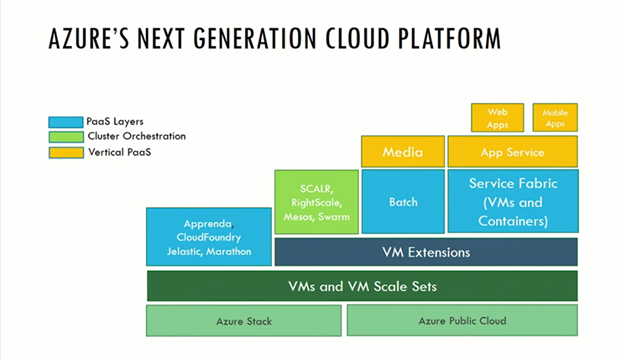
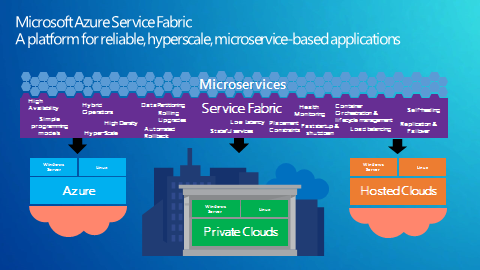
Azure Service Fabric (currently in Technical Preview) is a newer micro-service-oriented architecture that was designed for hyper-scalability. Many of the Microsoft first-party applications such as SQL Database, IoT Hubs, Cortana, and Document DB are built on this architecture.

image

If you expect to build the kind of application that will scale to support thousands or even millions of users Service Fabric may be for you. Otherwise investigate moving to a WebApps/WebJobs architecture.

Bill

Posted in Application Development, Architecture, Cloud, Cloud Computing, Microsoft Azure, Microsoft Azure WebApps, Microsoft Azure WebJobs, PaaS, Windows Azure, Windows Azure Web Sites | Tagged , , , | Leave a comment

AzureCon Update

[Updated 10-1-2015]

Today at AzureCon Microsoft announced a whole raft of features.  The announcements can be grouped into three categories.

  1. Features that were previously in Preview that have just gone into General Availability
  2. Features that have just entered the Public Preview Stage
  3. Features that will be Previewed in the near future

image

The Category 1 announcements were pretty interesting, but you have probably heard about them before since they have been in Preview for a while. I am not going to  cover them here. Category 2 and 3 are more interesting.

Here is a partial list of the announcements:

And more.  We will have much more to say about these announcement over the coming weeks.

In addition to three announcement packed keynotes there were over 60 on demand sessions which are currently available on the AzureCon site.

Bill

Posted in Uncategorized | Leave a comment

What’s Changed in Azure Over the Past Year?

A lot has changed in Azure over the past year.  In fact the Microsoft Service Update Page  lists over 100 new features, some small and some (like PaaS V2 and IaaS V2) major.

To update the members of my Nashville Azure Users Group I did a presentation on that topic  last night.  The deck is posted here.

Although importance is matter of opinion; some of the new features that we discussed were:

And more. Note that not in the deck because they just happened in the past few days were:

And the year is not over yet! Smile

Bill


As well as the recently released B2B and B2C Azure Active Directory previews,

Posted in Uncategorized | Leave a comment

Recipe for a Successful (Azure) User Group

Let me start (or rather restart) this blog series with a post that only tangentially has to do with Azure.  Smile It does however relate to starting and running a user group (which I hope will focus on Azure.)

I have been involved in one way or another with user groups for years. I currently run the Nashville Microsoft Azure Users Group. I do encourage everyone to either get involved in a local Azure user group, if one exists in your area, or to start one if it doesn’t. By way of motivation; it was because I was very active in the user group community years ago that I was made a Microsoft MVP and it eventually helped lead to my working for Microsoft DPE as an Architect Evangelist. That led to my discovering Azure (before it was called Azure) and ultimately led me to my day-job as a Cloud Technical Solutions Specialist at N3, LLC.

As part of my user group involvement I published a white paper years ago on how to run a successful user group. (I am the original author, however a lot of other user group leaders have contributed to it along the way)  Hopefully it will help anyone who wants to start a group of their own. Here it is:

Recipe for a Successful User Group.

Having been involved with user groups, for computer industry professionals for many years, I’d like to offer some recommendations.  If you’re thinking of starting a user group for computer industry professionals or are running one now, please contemplate these lessons, drawn from my experience. You might want to consider reviewing the list from time to time to keep you true to your mission.


1. You need a Web page.

You might be able to get by with a Meetup Group on Meetup.com.  They have some good services for posting meetings and notifying member as well as discussion groups and forums. But in any case having a separate web site (in addition to the Meetup group) adds a degree of professionalism.


Keep it simple, and clean.  This will allow members and potential members to find the information they are looking for quickly, and for people with slow connections, the page will load quickly.  Let your members and potential members know when and where meetings are located in the middle of the home page.  Make it obvious.


2. Your own web server or a web hosting service?

Use a web hosting service, here’s why.  Web hosting service can be had for $5-$10 a month.  You can’t even power a server for that much a month.  Think about it. Your volunteer web server maintainer has to provide, 24 by 7 up-time, server monitoring, back-ups, software updates and hardware upgrades.  Using a web hosting company, they are responsible, not one of your volunteers, and issues over hardware ownership are non-existent.


You might consider finding a company offering to donate web hosting.  I would strongly advise against it.  While may appear appealing, in the long run it’s not worth the trouble.  I have tried it, and these are the issues I have run in to.  You are a low priority, if a priority at all.  If the company ever retracts the offer, you will have the hassle of moving the web site, and then making sure all the pages and links work on the new site.  You will then have to changing the DNS and wait for the new DNS info to be updates while your site is unavailable.


For less that $100 you are better off focusing on other issues than your web site.


3. Your Web page needs a reasonable URL.

The usual http://www.some-isp.com/~username/UGname/ URL isn’t any good. You want people who know no more than the group’s name to find you easily. For that, http://www.our-group.org is ideal in the USA — and similar names for groups elsewhere, such as http://www.our-group.org.


You should choose a user group name whose Internet domain isn’t taken.  You can check at http://www.internic.net/whois.html   Do not type the potential name into your browser, as some companies will immediately place a 30 day hold on the name and then offer to sell it to you.


4. You need a regular meeting location.

Changing meeting locations will cause your group to loose attendees.  Why?  It’s too hard for people to remember where the meeting is from month to month.  You can tell them, email them, and they’ll still wind up at the wrong location.  Once that happens the word will get out that the group has folded, and then it’s too late.  The other reason is because it’s a strain on people.  They have to find out how to get there, where to park, whether the neighborhood’s OK to walk in, etc.


The location doesn’t have to be impressive: conference rooms, college cafeteria, a coffee shop, pizza parlor or community center are a few ideas.  See what’s available.


5. You need a regular meeting time.

“Regular” usually means same day of the week or month, and keep it that way.  Most groups meet once a month; first Wednesday at 6:00 or third Tuesday at 7:00.  Make it easy to remember and easy to enter in people’s smartphones and PC calendars. Don’t get fancy with things like “every other Thursday”: Make it so anyone with a calendar can easily figure out when the next meeting will be.


6. You need to avoid meeting-time conflicts.

Check out the schedules for nearby events: other user groups, sporting events or other events your audience is likely to attend.  Mid-week days are best; you should avoid having meetings on 3 day weekends.


7. You need to make sure that meetings happen as advertised, without fail.

Show up to have a meeting rain or shine, locked meeting room or not.  Have a few members show up early to avoid potential problems.  If there is a problem, let people know by posting a sign or flyers apologizing and letting them know when the next meeting will be occurring.


If you need to cancel or reschedule an event that you’ve already been advertising as “upcoming”, don’t simply remove the original listing on your Web pages: Continue to list it, prominently marked as cancelled/rescheduled.


8. You need a core of several experts.

You will need a couple of experts who are energetic and willing to share their knowledge with your members.  A users group should be neutral territory; they should not be allowed to sell their services during a meeting.


9. Your core volunteers need out-of-band methods of communication.

By that, I mean outside your user group’s regular electronic means of communication.  Use a list server or email groups.Meetup.com provides a mailing service, as do most web site user group CMS packages such as Kentico.


10. Place your meeting time and location prominently near the top of your Home page.

Make it overly obviously when and where you meetings are.  If you don’t, people will find your email address and ask.


11. Include a maps and directions to your meetings.

Be helpful to your members, include a map and clear step by step directions.  Offer suggestions for parking, and public transit if available.  Give as much detail as you can.


12. Emphasize on your main page what your group is all about, and the dues or fees or if meeting are free of charge and open to the public.

Make it clear before people arrive.  If there is a fee let people know in advance.


13. Use a list server or mailing list program to send out info to your group.

I have found a closed list server is the way to go.  It’s easier to maintain than a mail group, and you will not receive all of the “I’m out of the Office” or bounced message replies. For a small group you can use BCC or Meetup mailings.


Some commercial services let you set up “free” mailing lists on their servers, where their gain lies in revenues from mandatory ads auto-appended to all posts, plus of course the ability to sell your subscription list to other advertisers. Beware that you may find yourself not the “owner” of your own list, in the event of a dispute over its management.  In my opinion, this is a bad idea. (See comments above.)


You should own your mailing list and keep it private.  Make every message you send out important, so members will read them.  If not, your mail will quickly be linked to spam.


14. You don’t need to be in the Internet Service Provider business.

Leave the ISP business to the professionals.   Some groups have tried to offer this as a service to their members.  Don’t!  Same goes for email accounts.  You are a users group, not an ISP.  Leave it up to the professionals.


15. Don’t go into any other business, either.

Some user groups get sucked into the strangest, business schemes.  Don’t!  You are not a Web design firm, a technical support firm, a network design consulting firm, or a LAN cabling contractor or any other business. Not even if you’re told it’s for a wonderful charitable cause.


Along the same lines, remember that you are not a convenience for job recruiters: If allowed, they will spam your mailing lists and abuse every possible means of communication with your members. Nor are you a source of computers for the underprivileged, a repair service for random people’s broken PCs, or a help desk. I have been pestered by all of the above.  As much as you would like to help, leave it for the professional in you group.


The following checklist may be useful for your group, once established.


1. Web page:


a. Meetings:

[ ] Current meeting info?  Is it prominent?

[ ] Day of the week?  Beginning time?  Ending time?

[ ] Double-checked day/date matches against a calendar and conflicting events.

(E.g., is the “Friday, March 28” you listed an error, because the 28th is a Thursday?)

[ ] Location?

[ ] Include a link to a map

[ ] Directions (car, public transit)?  Parking tips?

[ ] Information on upcoming meetings

[ ] Is an RSVP mail required to attend meetings?

[ ] Note that meetings are free and open to the public (if they are)?

[ ] If there’s a special fee, is it disclosed next to the event listing?

[ ] If location / time / date formula has changed recently, is this noted prominently?

[ ] Have you checked for event conflicts with other nearby groups, or with holidays?


b. General:

[ ] Includes event date-formulas (e.g., 4th Tuesdays)? Prominently?


c. Periodically (maybe every quarter):

[ ] Checked all links on your site for dead links?

[ ] Checked your Web server’s logs for pages requested but not found? (You’ll want to put a referral page at that URL.)

[ ] Read all your Web content attentively for outdated content?


2. Other, periodical:

[ ] Reviewed/updated all user group lists that have entries concerning your group.  Are they correct and up to date?

[ ] Reviewed all sites that link to yours? Advised their webmasters of needed corrections?


Bill

Posted in User Groups, Windows Azure | 3 Comments

I’m Baaaack

Haven’t posted in almost a year, but I promise to post more frequently now. My focus is still the Cloud, Azure and related subjects.

Bill Zack

Posted in Architecture, Cloud, Cloud Computing | Leave a comment

Microsoft Azure Quick at Codestock

Last week I presented a Lightning Talk on Microsoft Azure at the Codestock developers conference in Knoxville, Tennessee.  The title of my talk was Microsoft Azure Quick.

For those of you who don’t know, a Lightning Talk is where you squeeze everything that you have to say into a 15-20 minute time slot.  My challenge was to fit Azure, an enormously rich and powerful set of Cloud services, into that time frame. In order to do that I decided to focus on how quickly you can create a Microsoft Azure Website using Visual Studio and the Microsoft Azure Management Portal. (Thus the title:  Microsoft Azure Quick)

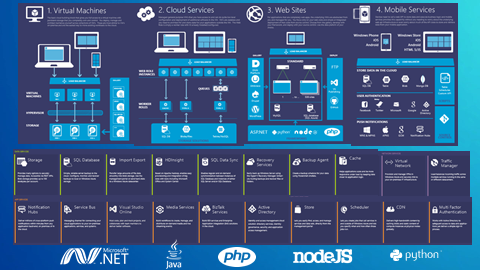
We did give them a whole Azure 20,000 foot overview using a great build slide from Microsoft:

image

Then we showed them a few more slides about what we were about to demo and demoed it. (You can see the full slide deck here.)

We created a web site in the Management Portal, opened Visual Studio 2013  created a simple ASP.NET web site and tested it locally. Then we published it up to the Azure Website that we had previously created.  Along the way I demonstrated the Monitoring and Autoscaling capabilities of the Website using tabs in the the Management Portal.

We wrapped up the talk with a few references and information on the various ways that they could get an  Azure subscription in order to try this out for themselves. (See here. )

Hopefully my talk stimulated them to dig deeper into Microsoft Azure and many of the services and frameworks that we did not have time to cover. Again, the diagram that we started the presentation with was an excellent starting point for that activity.

Bill

Technorati Tags: ,,
Posted in Uncategorized | Leave a comment

Podcast: Moving a Windows Azure Virtual Machine

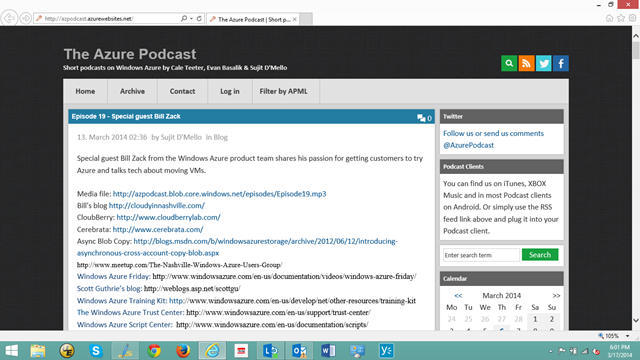
On March 12, 2014 I was the featured guest on the Azure Podcast Episode 19. image

Here is a summary of that conversation:

As some of you may know I am a Windows Azure Consultant and a Cloud Technical Solutions Specialist working with an internal Microsoft product team based out of N3, an Atlanta based consulting firm. We handle questions from people who sign up for Azure Free Trials and who attend Azure public events. 

We have a hierarchy of support people in our team: Qualifiers that will contact you to see if you need any help and then pass you on to our 1st level technical support that will try to answer any technical questions that you have. If they can’t answer the question then it gets escalated to my team. We have folks all over the world in places like Scotland, Germany Russia, Italy and of course the US. So we have most time zones covered. 

Understanding what a VM is

The key to moving a VM anywhere is to understand what a VM really is in Windows Azure. A VM is based on a VHD image persisted in a Page Blob. When you create a VM it locks on to the underlying Page Blob. There are two kinds of VHDs Syspreped VHDs that you want to use to create multiple similar VMs and non-Syspreped VHDs that you just want to install

Moving VMs

One of the things that comes up frequently is how to move a Virtual Machine from one “place” to another. The desired target could be another Virtual Network, Cloud Service, Subscription or even another data center or geographic region.

The first piece of advice that I would give you is don’t! Don’t get yourself into the position of having to move a VM in the first place!

I know that we make it pretty easy to just jump in and just create a VM ignoring things like Virtual Networks, Cloud Services and DNS. And to get some early experience that is fine. But when it comes to doing something for real then you should do some advance planning to put things where you need them.

Now that being said there are use cases where you do really need to move things around. In some cases you can get some help from Windows Azure Support but it is always a good Idea to be able to do it yourself.

How to Move

To move the VHD to another location Stop(Deallocate) and delete the old VM but remember not delete any of the attached disks (one of which is the OS disk). That will release the lock on the Blob. Then  look in storage to find the VHD in the VHDs container in your Storage Account.

If you need to move it outside of the current subscription, for instance to another subscription or even another data center, then you need to get it to the remote location. You can copy the underlying Blob to the remote subscription using the new Async Blob Copy command or a third party utility like Cerebrata or Cloudberry. (Note: If all you want to do is move the VM to another subscription you can contact Microsoft Windows Azure Support and they can do that for you since that just involved a table change inside of Windows Azure.)

Once the Blob is moved to its new location you can recreate  the OS disk from the Blob URL using Virtual Machines -> Disks -> Create Disk and then Create the VM with New-> Virtual Machine -> From Gallery Selecting MyDisks to pick the disk you just created. If you are just moving it to another Virtual Network in the Same subscription you can omit the first step of creating the Disk. Since it will already be there.

Remember to set appropriate permissions on the Blob using Shared Access Signature before you copy it if necessary.

Use PowerShell

Obviously if you are going to do this a lot PowerShell will be your best friend. In fact there are some PowerShell scripts out there that you can take and adapt for this. And the new SDK Upload command will work where the source and destination are both in Azure. In fact the Windows Azure Script Center  is a great resource that you should become familiar with. Lots of good ideas there. (My thanks to Jean-Claude Grattery from N3 for pointing it out to me.)

Closing

Like I said in the beginning, it is good to know how to do this, but even better to plan ahead to avoid having to do it. Because it is a hassle.

The Azure Podcast  web site for the download also contains some links to Windows Azure information sources that may prove useful to you.

Bill

Posted in Uncategorized | Leave a comment

Windows Azure Global Bootcamp

On Saturday, March 29, 2014 we are out to make some records!

In April of 2013 we held the first Global Windows Azure Bootcamp at more than 90 locations around the globe! This year we want to again offer up a one day deep dive class to help thousands of people get up to speed on developing Cloud Computing Applications for Windows Azure. In addition to this great learning opportunity the hands on labs will feature pooling a huge global compute farm to perform diabetes research!

The Nashville Windows Azure Users Group is hosting the Nashville session, but even if you do not live near here check out the Global Bootcamp site for a city near you.

Bill

Posted in Uncategorized | Leave a comment