Introducing the New Windows Azure at the Hartford Code Camp

On Saturday June 23rd I presented an updated version of my Windows Azure 2.0 Platform Overview at the Hartford Code Camp.  Since there were quite a few major Windows Azure announcements on June 7th this was a major update of my existing presentation.  In fact I was updating it until the night before the presentation. Smile

image

A Link to the Windows Azure 2.0 Platform Overview presentation deck is included above. This deck is one that I have been evolving and updating over the last 4 years as Windows Azure has been evolving and reflects my current understanding of the features now in the product.  That includes old standbys such as Cloud Services (Web and Worker Roles), Storage (Blobs, Tables, Drives and Queues), and SQL Database (the new name for SQL Azure)  as well as the new Web Sites, Virtual Machine and Virtual Networking Infrastructure as a Service (IaaS) features and Linux support. 

The presentation also has some good references to get you started learning about Windows Azure.  In particular I want to draw your attention to the new Windows Azure Training Kit which was just released last week. 

Bill Zack

image

Posted in Application Development, Architecture, Cloud, Cloud Computing, Event, IaaS, Linux, PaaS, User Groups, Windows Azure | Tagged , , , , , , , , , | Leave a comment

Windows Azure 2.0 – IaaS and two flavors of PaaS

Last week Microsoft announced what can arguably be called Windows Azure 2.0  (Although Microsoft has refrained from using that term. Smile

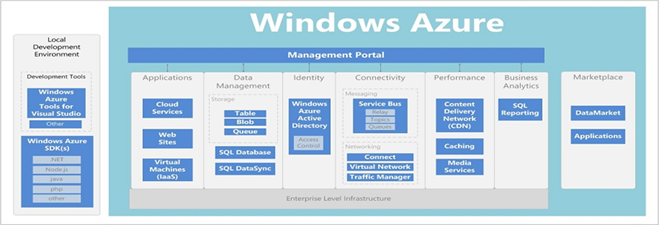
This diagram from the MSDN Library summarizes the new structure of Windows Azure (for a larger view and more details see this MSDN entry.

Windows Azure Feature to Capability Map

In addition to extending Windows Azure’s reach into the pure IaaS dimension they have also announced another, higher level, PaaS platform, Windows Azure Web Sites. 

Windows Azure Web Sites are quick easy to deploy two tier web sites backed by a SQL Server or MySQL database creatable and configurable in seconds instead of minutes.  They achieve his feat by allocating space for your site in a pool of Shared Virtual machines that are already warmed up and ready to go. When your traffic increases or you want to run in a dedicated VM then you have the option to upgrade to a Reserved (dedicated) VM to host your web site. Although currently in preview it is expected that up to 10 web sites can be created and, at the low volume/shared level it is expected to be free.  This is an outstanding options, especially for startups.  It competes directly with other products like Google AppEngine.

Of course there are still the previous PaaS services of Windows Azure Compute (rebranded as Cloud Services), Windows Azure Storage and SQL Azure (rebranded as SQL Databases).  These services can be used to develop the familiar Windows Azure PaaS applications that we have been able to construct for the past three years.

And old friends like Service Bus, with some enhancements, are still there as well, however the Access Control Service had been incorporated as a feature of the new Windows Azure Active Directory. 

When it comes to IaaS you will hear a lot about how Windows Azure now supports persistent VMs that can be updated and persisted to Windows Azure blob storage and booted from there.  This will allow the forklift migration of many existing on-premise applications to Windows Azure. Not that that is a great idea since most applications should have some change made to run effectively in the cloud, however, it is useful as an on-ramp to more cloud-optimized application architectures.

For those of you who want more look at the the session recordings from TechEd Learn Windows Azure.

Bill Zack

image

Posted in Application Development, Architecture, Cloud, Cloud Computing, IaaS, PaaS, Windows Azure | Tagged , , , , , , | Leave a comment

I am Presenting Patterns for Cloud Computing at Cloud Expo June 11-14 in New York

I was not originally scheduled to present my Patterns for Cloud Computing talk at Cloud Expo again this year (having done it for the last two years) but they had a last-minute cancellation and asked me to do it again. As a result I will be presenting it on Jun 14th at 3:45 PM at the Jacob Javits Convention Center in New York. This will be an updated talk with the latest information on the subject. 

If any of you want a free VIP Pass to Cloud Expo you can use the registration code cloudspeakerguestVIPgold (case sensitive) to receive a full conference pass. By using the coupon code the price will reset to $0. You can register at https://www.blueskyz.com/v3/Login.aspx?ClientID=19&EventID=56&sg=168x

Also note that there is a free evening CloudCamp scheduled for June 12th at 5:30 PM after the Expo sessions. I recommend it highly. See http://cloudcamp.org/ny/335.

See you there.

Bill Zack

image

Posted in Amazon Web Services, Application Development, Architecture, Cloud, Cloud Computing, Event, Windows Azure | Tagged , , , , , , | Leave a comment

Software as a Service Development Life Cycle and the Cloud

Last October I co-authored a white paper on the subject of the Software as a Service Development Life Cycle (SaaS DLC).  It was published at InfoQ.com. InfoQ (Information Queue) is: “an independent online community focused on change and innovation in enterprise software development, targeted primarily at the technical architect, technical team lead (senior developer), and project manager.”

image

The SaaS Development Lifecycle (SaaS DLC) is an adaptation of the traditional iterative software development process with additional important phases added. These additional phases – Evaluation, Subscribing and Operations are less prominent and implicit for on-premise deployments. However, the activities performed during these phases become critical success factors for a SaaS development and deployment.

The white paper defined all the Actors and Activities to be performed in each phase as well as the Business and Technical Inputs and the Output Decisions and Deliverables resulting from the phase.  You can read the full white paper here. There are, however a few points that I want to emphasize concerning the phases and phase details that are different when approaching your first Cloud project.

First in the interests of full disclosure: You should know that I make my living helping customers move applications (or parts of applications) to the Cloud. That incudes helping them make such decisions as what Cloud Platform to adopt and what applications or application components would benefit from being moved to the Cloud. (See my previous blog post: You Just Might Be a Cloud App.)  I feel strongly that your first Cloud Project, like projects involving any new platform, should have the guidance of an Architect or Consultant specializing in that platform.

During the Envisioning Phase where Business Inputs are defined one of those inputs should be collateral on the chosen cloud platform (or platforms from which a selection will be made).  You will probably also want to review research from sources like the Burton Group, Gartner, and Forrester concerning the economics of cloud computing and how existing cloud platforms compare.

During the Platform Evaluation phase (which is new with  the SaaS DLC) you will  determine each alternative platform’s fitness for the service. Deliverables from this phase should include a platform comparison  that includes considerations such as economics, capability, supportability, security and compliance. Cloud platform comparison results from the operations perspective should include considerations such as reliability, availability, scalability, performance and disaster recovery. If a Proof of Concept (POC) is part of the platform selection strategy then POC results encompassing both functional as well as non-functional aspects of the prospective service should result. If the POC is based on, or entails a subset of, an application that you have already targeted for a move to the Cloud then a useful output of the POC can be a refined architecture that can be implemented on the selected cloud platform.

In the Subscribing phase (which is also new with the SaaS DLC) you acquire a production quality platform subscription. Deliverables from this phase should include your Backup, Recovery and Disaster recovery strategies, Subscription Management strategy and Production Support strategy. Most of this is understandable.  The new factors such as Subscription Management stems from the pay-as-you-go Operating Expenditure (OPEX) charging model that is new to Cloud based applications as opposed to applications that are run in your own data center which is based on a Capital Expeditor (CAPEX) cost model.  When it comes to Production Support existing operations management tools need to be extended to encompass Cloud-based assets or unique Cloud management tools have to be acquired or developed.

Conclusion

While the initial SaaS projects require more emphasis on cloud provider evaluation, subscription acquisition and operation, subsequent SaaS development efforts can leverage the know-how acquired previously thereby allowing the project teams to short circuit the Evaluation and Subscribing phases.

The SaaS DLC described in this paper important for software companies building software to offer up as services to consumers and other businesses . It is equally valid for services provided by enterprise IT departments to their internal business units. It is pretty clear today that even enterprise IT departments must start looking at themselves as Service Providers and act accordingly.

Bill Zack

Posted in Application Development, Cloud, Cloud Computing, Development Life Cycle | Tagged , , , | Leave a comment

Cloud Design Patterns

Rightscale is a company that sells auto scaling software for multiple clouds, primarily Amazon Web Services.  They do not support Windows Azure as of yet. See below for an update on this.

However, on their web site they have a set of Cloud application templates that implement common cloud architectural patterns quite well.  Even though they are not designed for Windows Azure I think that you can see how they might be applicable to that platform as well.  UPDATE: As of June 7th, 2012 concurrent with the announcement of the new Windows Azure IaaS features Rightscale has announced that their Cloud Application Templates will be available for Windows Azure as well. Smile

image

In the white paper referenced above they give the excellent advice that you try and use the simplest pattern that will do the job and only use more complex patterns when absolutely necessary. (The KISS principle)  IMHO that is excellent advice. (See my blog tag line: Making Clouds as simple as possible, but no simpler.) Smile

The patterns they support are:

  • Single “All-in-one” Server
  • Single Cloud Site Architectures
    • Non-Redundant 3-Tier Architecture
    • Redundant 3-Tier Architecture
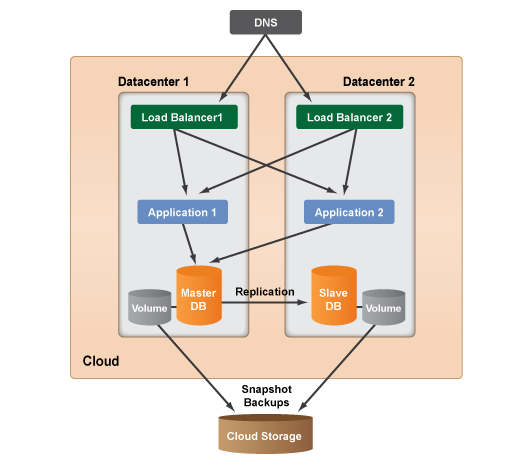
    • Multi-Datacenter Architecture
    • Autoscaling Architecture
    • Scalable Architecture with Membase (Relate to  Windows Azure Table Storage)
    • Scalable Multi-Tier Architecture with Memcached (Relate to  Windows Azure Cache)
    • Scalable Queue-based Setups
      • Number of Jobs
      • Time
      • Internal Hybrid Setup
      • Alert-based and Queue-based Scalable Setup
  • Hybrid Cloud Site Architectures
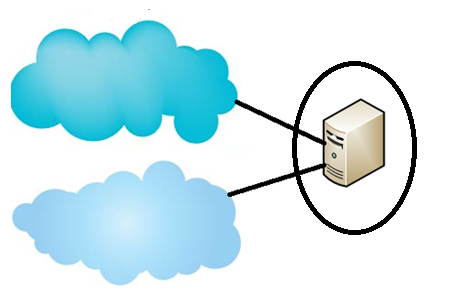
    • Scalable MultiCloud Architecture
    • Failover MultiCloud Architecture
    • MultiCloud Disaster Recovery Architecture
    • Cloud and Dedicated Hosting Architecture

I will leave it as an exercise for you to map them to Windows Azure and use them in your application designs. Smile


Bill Zack


clip_image001

Posted in Amazon Web Services, Application Development, Architecture, Cloud, Cloud Computing, IaaS, PaaS, SaaS, Windows Azure | Tagged , , , , , , , , | Leave a comment

A Cloud is a Cloud is a Cloud?

There is an interesting thread going on in LinkedIn: How would you rank the top 5 Cloud providers ?  Peoples answers are all over the map.

Far be it for me to try and add clarity to a murky situationSmile but with everyone and their brother claiming that what they have, or previously already had before, is Cloud it is time to get some clarity on the subject.  As an Architect I am always looking for a taxonomy that defines the characteristics of things and their relationship in order to simplify them


To start, pretty much everyone who is objective agrees that the National Bureau of Standards has the best vendor fud-free definition of Cloud.  A lot of thought went into this definition and it is a shame to see various vendors with an axe to grind ignoring it when it is convenient. Sad smile


The National Institute of Standards (NIST) Cloud Computing Model

The model defines Cloud as “Enabling convenient, on-demand network access to a shared pool of configurable computing resources (e.g., networks, servers, storage, applications, and services) that can be rapidly provisioned and released with minimal management effort or service provider interaction.”


The NIST Model is composed of:

  • 5 Essential characteristics
  • 3 Service models
  • 4 Deployment models

The 5 Essential Characteristics are

  • On-demand self-service
  • Broad network access
  • Resource pooling
  • Rapid elasticity
  • Measured service

The 3 Service Models are

  • Software as a Service (SaaS)
  • Platform as a Service (PaaS)
  • Infrastructure as a Service (IaaS)

The 4 Deployment Models are

  • Public Cloud
  • Private Cloud
  • Community Cloud
  • Hybrid Cloud

Public Cloud is a

  • Pool of computing resources
  • Offered by a vendor
  • Typically a “pay as you go” model
  • Self provisioned

Private Cloud is a

  • Pool of computing resources   
  • Lives in a self-managed datacenter   
  • Normally a measured service   
  • Resources may be self-provisioned

Community Cloud is a Cloud that is

  • Shared by several organizations with similar requirements
  • Provides a higher level of privacy, security and/or policy compliance
  • Hosted on or off-premises

Hybrid Cloud is a

  • Composition of two or more public/private/community Clouds
  • Clouds are bound together by standardized or proprietary technology
  • Distributes processing between types of clouds and  on-premise data centers

A Few Comments

Every bullet point above is worthy of an exposition, however a blog post that is too long is a bad idea and may put you to sleep. Smile  Just a few comments.

My own interests

I am mainly interested in Public and Hybrid Clouds. I deal mostly with medium to large sized companies and software vendors that are just beginning to take advantage of Cloud and who are trying to determine which of their applications (or parts of applications) would be a good fit for the cloud.  (See my previous blog post “You Just Might be a Cloud App”.)

Furthermore My own personal interest is also in Public Clouds that support applications developed for Windows and .NET, so that excludes a number of the public clouds that are LAMP (Linux, Apache, MySQL, PHP) or Java/Ruby only, although  number of them (such as Windows Azure and Amazon Web Services) do support both.

A Question

It is too late to get things under control and get everyone to abide by common logical definitions of Cloud? Or is it too late? Smile

 What do you think?

Bill

image

Posted in Amazon Web Services, Architecture, Cloud, Cloud Computing, IaaS, PaaS, SaaS, Windows Azure | Tagged , , , , , , , | Leave a comment

Building Cloud-Portable and Cloud-Burstable .NET Applications With Windows Azure and Amazon Web Services

image

Definitions

Cloud-Burstable Applications are those built using an application deployment model in which an application runs in a private cloud or corporate data center and bursts into a public cloud (or clouds)  when the demand for computing or storage capacity spikes.

Cloud-Portable Applications are applications that can take advantage of multiple clouds in order t0 prevent lock-in and/or make the applications more resilient in the face of cloud outages.

Motivation

It should be pretty clear why we want to build applications that are Cloud-Burstable. It would be a great advantage to be able to overflow our resource requirements into the cloud (or clouds). The advantage of this is that the company only has to pay for for extra compute and storage resources when they are needed.

Cloud-Portable applications, on the other hand, make you less vulnerable to cloud outages as both Amazon Web Services (AWS) and Windows Azure users have experienced recently.

Another benefit of Cloud-Portability is to remove the fear of cloud vendor lock-in. It is always nice to feel that you can take your business elsewhere even if you never do. Smile

Architecture

Just because we have moved to the cloud does not mean that we should automatically abandon all the good architectural design techniques and design patterns that we have been using successfully in developing on-premise applications. Designing an application that segregates functionality into layers (such as Presentation, Business Logic and Data Access) can go a long way to making an application more portable.

If we examine the typical business application we will probably find that the bulk of the application exists in the Business Logic Layer. In the case of the Data Access Layer in particular the differences in the APIs supported by a particular vendor’s offering can be hidden from higher level layers of the application. (Encapsulating an area of an application that is subject to change is a proven architectural technique.)

Lets limit our discussion to on-premise applications running in your data center and the two most popular public clouds; Amazon Web Services and Windows Azure. We also limit our discussion to .NET web applications, however, in principle the same approached should be applicable to other public and private clouds. 

IMO there are good ways to achieve Cloud-Bursting between an on-premise data center and the Azure and/or Amazon clouds .  The following assumes a well architected application that is built using a three-tier model.(And yes I know what “assume” means Smile,  but it should be more or less true for most applications.)

Anyway, lets attack the architecture layer by layer.

Presentation Layer

The Presentation layer of a .NET web app is primarily an ASP.NET application so, if the application is of the type that was originally (or newly) written to run in a web farm environment with externalized application state then not much is required to make it portable.  If it uses SQL Server in its Data Layer then compatibility is very high anyway. (If not, see below.)

Windows Azure runs ASP.NET applications that are so architected.  Some minor encapsulation might be required to support this, but it should be minimal.

AWS does too, by virtue of the fact that it is Infrastructure as a Service (IaaS) and fully supports Windows, IIS, .NET and .NET applications.  If it runs on premise then it can be hoisted up onto AWS without too much difficulty.   (Ignoring considerations caused by physical separation, such as latency.)

Business Layer

If Business rules are encapsulated in a separate Business Layer then this layer should be more-or-less totally platform independent. There may be a need for some encapsulation if the business layer makes any direct API calls to other services. It shouldn’t as a rule. So it should be the most portable of all.

Data Layer

Here is where the major differences between on-premise, Azure and Amazon exist.  Encapsulation can be used to add a level of abstraction between:
• Blob storage services (AWS Simple Storage Service and Windows Azure Blob Storage)
• NoSQL storage (AWS Simple DB/DynamoDB and Windows Azure Table Storage)
• Relational database (AWS Relational Data Service and SQL Azure)

In the above discussion I have not included the on-premise equivalents of storage APIs such as those provided by the Windows file system, SQL Server etc. but the approach should be easily extendable.

Other APIs could be suitably encapsulated and made platform independent where they exist.  And techniques like Dependency Injection and Factory Patterns could be used to select the appropriate interface modules at execution time based upon configuration or convention.

Conclusion

I realize that this smacks of “SMOP” (Simple Matter of Programming), and that the devil is in the details, but it should be a workable strategy. Of course it all depends on whether we are talking about a greenfield app or one that already exists, and whether it is well-written using a three-tier model or not.

What do you think?

Bill Zack

image

Posted in Amazon Web Services, Application Development, Architecture, Cloud, Cloud Computing, IaaS, PaaS, Windows Azure | Tagged , , , , , , , , | Leave a comment

You Just Might be a Cloud App

With Apologies to Jeff Foxworthy (“You just might be a redneck“)

You just might be a Cloud App, if:

You only need processing or storage periodically, for instance during certain times of the month, week or day. An example would be end-of-day processing, Christmas rush, etc.  The rest of the time any over-capacity in terms of server and other resources is wasted. Under capacity is unthinkable and probably a CLM (Career-Limiting Move Smile).

You have no clue as to how successful you new idea will be (or not)!  Why buy lots of servers for what may never happen.  On the other hand your new idea may go viral, and in that case …. Smile Oh yes, and even if you do go viral, what if it doesn’t last? Sad smile  (Remember, scaling down can be as important as scaling up.) With physical hardware it is hard to sell off old equipment.

You  need to get your new great idea up and running quickly and don’t have time to wait for new hardware to be purchased, arrive and be set up. (God grant me patience, and I want it RIGHT NOW! Smile)

You are not mission critical (core to the companies business) and can moved out to the Cloud.

Regulations in your industry have caught up with the cloud and it is “safe” to put your data and/or processing in the Cloud. Regrettably some regulatory bodies and public Clouds have not.  Some data may have to remain safely behind your firewall. Even in that case some of your component parts may be appropriate to move to the Cloud while other stay safely behind your on premise firewall. In that case a Hybrid application architecture is a useful design to consider in order to leverage the advantages of the cloud while keeping some data (and processing) behind the firewall.

You want to leverage the attributes of the Cloud such as: Scalability, Availability,Elasticity, on-demand self-provisioning, and measured operating costs. (See the National Institute of Standards definition of Cloud Computing for more details.)

So, if you are a Cloud app be happy in the Cloud. 🙂  If not maybe you can be a Hybrid App living partly on premise and partly in the cloud, having the best advantages of both. Smile

image

Bill

Posted in Architecture, Cloud, Cloud Computing | Tagged , , , , | Leave a comment

Windows Azure Security Best Practices and Resources

One of my ex co-workers at Microsoft, Bruce Kyle, recently posted a 7 part blog series on Windows Azure Security Best Practices.  Bruce wrote the series of articles for Microsoft ISVs (Independent Software Vendors).  However, as I said in my recent InfoQ white paper, The Software as a Service Development Life Cycle, even non-ISVs should start thinking of themselves as providing IT as a service to their internal customers. Smile So this series should be of interest to everyone designing and developing applications to run in Windows Azure.  This is the best treatment of the subject that I have seen and it is chock-full of excellent references to other sources of security information.

Part 1 covers the potential threat attack vectors and defenses against them.

Since security is a shared responsibility Part 2 discusses how Windows Azure secures their platform services and what you need to do to carry out your responsibilities.  It also includes a list of ten important things that you should know about Windows Azure security.   It concludes with a discussion of Compliance and the certifications that Windows Azure components do (and do not) currently have.

Part 3 is dedicated to a continued discussion of your responsibilities concerning security.  Starting with an Architecture approach it covers the Security Frame methodology defined by the Microsoft Patterns & Practices group as a way to identify and and mitigate any and all threats to your application running in Windows Azure.It includes several useful  checklist for securing your Windows Azure application. It also covers lightly the Security Development Life Cycle that is used by Microsoft on all internal software development projects and that is recommended that customers follow in developing their applications.

Part 4 covers additional guidelines and best practices for securing your applications. 

The subject of Claims-based Identity and Single Sign-On is the focus of Part 5.  This incudes such topics as using Windows Identity Foundation to integrate on-premise Active Directory and Windows Azure security.

Part 6 continues the discussion with coverage of Active Directory and Windows Azure  Access Control Services used to extend your on-premise security into the cloud.  It also talks about using Windows Azure Connect to blend on-premise and in Azure applications in order to build hybrid applications.  It wraps up with a brief discussion of the Windows Azure Service Bus, another Windows Azure service that you can use to build secure hybrid applications.

A bunch of additional miscellaneous best practices are covered in Part 7, the final part of the series. (So far Smile)

I cannot recommend this series of articles highly enough. Everyone designing and/or developing applications to run in Windows Azure should read this series and the many references to other sources of information that it contains.

Bill Zack

Posted in Cloud Computing, Security, Windows Azure | Leave a comment

Recent Windows Azure Developments

Here are some recent Windows Azure developments that you may have missed. I think that they are worth highlighting.

Windows Azure Endpoint Protection

One of the deficiencies in Windows Azure up until recently was the lack of virus checking/malware protection or even the ability to install your own.  Recently Microsoft released a community technical preview of Microsoft Endpoint Protection (MEP) for Windows Azure. 

MEP is a plugin that allows you to include anti-malware protection in your Windows Azure Virtual Machines.  Here are more details.

Windows Azure Backup Service for Windows 8

To further illustrate how important the cloud is becoming Microsoft recently announced the Beta of The Microsoft Online Backup Service. This is a Windows Azure based backup solution that can be used to backup Windows 8 files and folders to Windows Azure Blob storage. 

This service is expected to be exposed through the standard Windows backup.  The Windows Server blog has a blog post describing the beta.  The Beta site, including support forums is located here.

Windows Azure Based Team Foundation Server Adds In-the-Cloud Build Capability.

The Windows Azure based Team Foundation Server as a Service cloud offering has been under development at Microsoft for a while.  Recently the invitation-only Community Technical Preview has added the ability to run an application build in the service. (See more details in this blog post.)

The significance of this feature is that, when released, it will better serve the needs of globally distributed software development teams as well as smaller companies that do not have their own build infrastructure. 

Up until now all Windows Azure development and application build has been done on-premise and then the resulting application deployed to the cloud. This is the first foray by Microsoft into cloud-based development and project management services.

Bill Zack

Posted in Anti-Malware, Application Development, Cloud, Windows 8, Windows Azure | Leave a comment